Essentially, a well sketch consists of a row of header columns and a row of well columns.
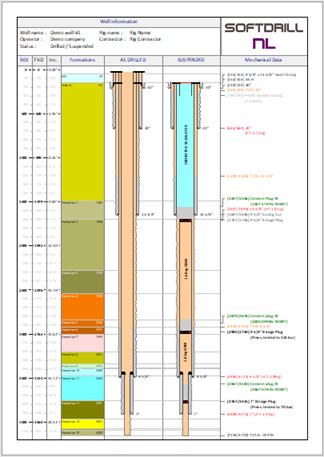
Each column type has properties common to all column types and it's own type-specific properties. Therefore, each column type has its own type of editor which will allow changing common properties as well as properties specific to that column type.
 For each column type the background color may be set (default is white). This may be useful when copying and pasting columns into other documents (e.g. a presentation) with a background color different than white.
For more information, click on the relevant column type below.
•Axis (MD, TVD or Inclination)
As with all other types, the well column can be linked to a wellbore trajectory (wellplan and/or actual surveys) for calculation of TVD's.
All elements in the well columns (formations, casings, labels, etc.) have common properties, such a line color, font type, font color, etc. Each column editor will have a Properties... button that becomes enabled as soon as one or more elements become selected.
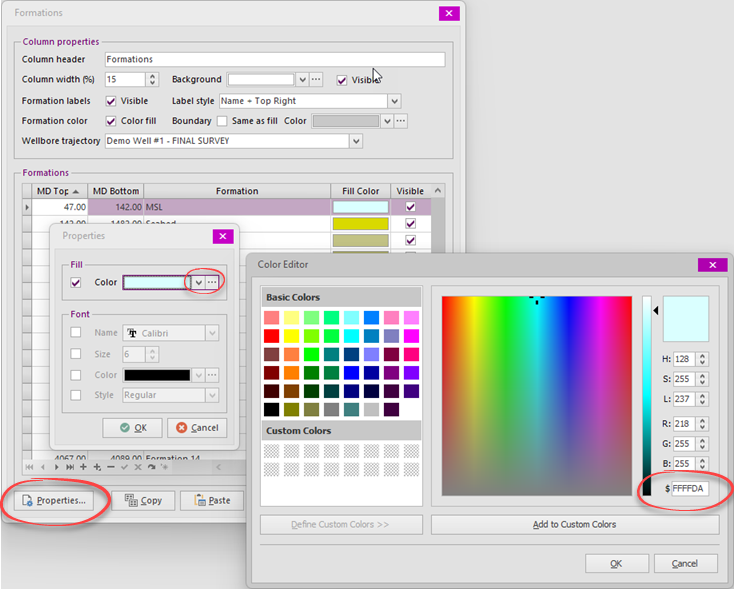
The checkboxes in the Properties dialog determine which properties will be updated when the OK button is clicked.
When the ... button in a color edit is clicked, the Color Editor will appear. From Color Editor quick selection of a Basic or pre-defined Custom Color can be selected. Alternatively, a custom color may be specified in either HSL, RGB or hexadecimal format.
The easiest way to copy colors is to copy & paste the hexadecimal value ($ field).
Note: Custom Colors been pre-defined for (left to right):
•Cement
•Tail cement
•Waterbased mud
•Oilbased mud
•Sea water or brine
•Reservoir sand
Copyright © 2026 Softdrill NL