.png)
|
Select Header |
|
|
A drop-down list that allows for selection of one of the Headers currently available in the Well Sketch drawing. |
|
|
|
|
.png)
.png)
|
Add, Edit & Delete... |
|
|
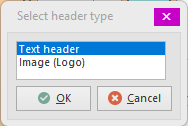
Applies to the Headers in the Well Sketch drawing. When Adding a header, a dialog will appear that presents the available header types that may be added to the drawing. Select one of the types and press OK to create a new Header of that type.
The Edit and Delete... actions apply to the currently selected Header. |
|
|
|
|
.png)
.png)
|
Copy, Cut & Paste |
|
|
Allows copying (or cutting) of a header. Note that Well Sketch registers its own Windows clipboard format so when a header is copied (or cut), the Paste option in other programs (e.g. Microsoft Word™, Excel™, etc.) will not be available. The Paste button in the Well Sketch header menu however, will become available in all currently opened Well Sketch drawings. |
|
|
|
|
.png)
.png)
Copyright © 2026 Softdrill NL