.png)
|
Select Column |
|
|
A drop-down list that allows for selection of one of the Columns currently available in the Well Sketch drawing. |
|
|
|
|
.png)
.png)
|
Add, Edit & Delete |
|
|
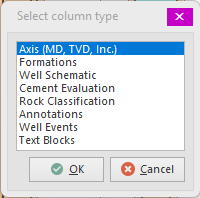
Applies to the Columns in the Well Sketch drawing. When Adding a column, a dialog will appear that presents the available column types that may be added to the drawing. Select one of the types and press OK to create a new Column of that type.
The Edit and Delete... actions apply to the currently selected Column. |
|
|
|
|
.png)
.png)
|
Some column settings that may be adjusted directly (i.e. without opening the column's editor). The first two are to quickly set the columns width (as percentage of the total well sketch width) and the column's visibility. To adjust the reference Elevation, the column must not be associated with a trajectory (survey or wellplan). Click Left or Right to move the column accordingly. |
.png)
|
Copy, cut & paste |
|
|
Allows copying (or cutting) of a column. Note that Well Sketch registers its own Windows clipboard format so when a column is copied (or cut), the Paste option in other programs (e.g. Microsoft Word™, Excel™, etc.) will not be available. The Paste button in the Well Sketch column menu however, will become available in all currently opened Well Sketch drawings.
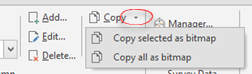
Note that the Copy button also has a drop-down button. This drops down a menu that presents two options.
The first option copies the currently selected column to the Windows clipboard in bitmap format, whereas the second option does this for all currently visible columns (in a single bitmap).
Note that in this case, the Paste option will be available in other programs as bitmap is a standard Windows format. As such well columns may be pasted into drilling programs (Microsoft Word™), calculation sheets (Microsoft Excel™) or presentations (Microsoft Powerpoint™).
There is also an option to copy and paste the entire well sketch. |
|
|
|
|
.png)
.png)
Copyright © 2026 Softdrill NL