When viewing the Survey or Wellplan data on the wellpath form, a quick plot can be viewed by clicking the  button in the toolbar.
This will bring up the well plot window.
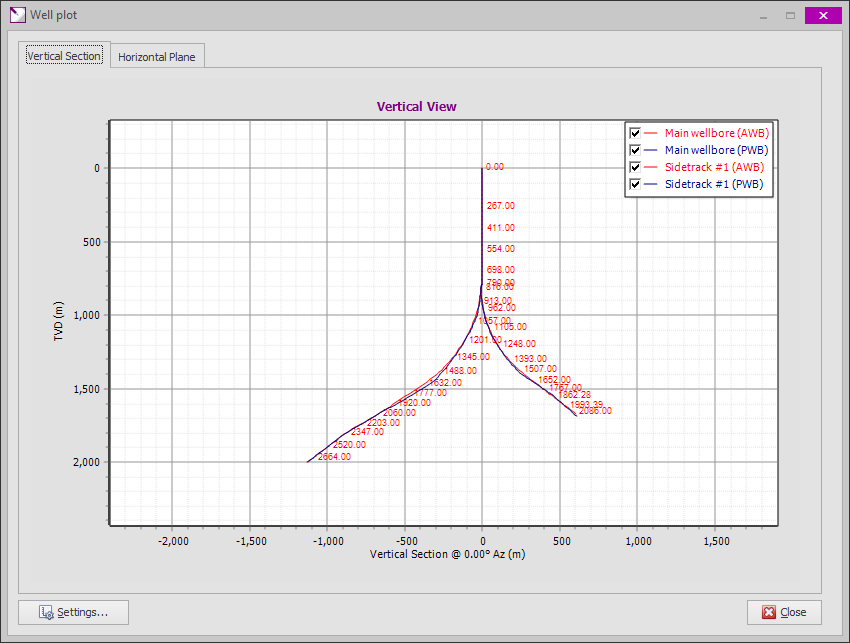
•The window may be resized as required, either using the minimize or maximize buttons on the top-right (next to close button) or by dragging the bottom-right corner.
•There are two tabs available: Vertical Section (side view) and Horizontal Plane (top view).
•Zooming of the plot is done by dragging the mouse from top-left to bottom-right of the area to be zoomed in.
•Dragging from bottom-right to top-left with the mouse resets the scaling to the default.
•Dragging with the right mouse button pans the plot graph.
•By default, all well trajectories (actual and planned) are shown for the entire well (i.e. for all wellpaths). Individual trajectories (actual or planned) may be hidden temporarily by unchecking the corresponding box in the legend (top right in above example).
•The plot may be copied to the Windows clipboard by right-clicking it and selecting [Copy to clipboard] from the context menu. When copied to the clpboard, the plot can be pasted in to other documents (e.g. Word documents, Powerpoint presentations, etc.).
Additional settings for the plots may be modified by clicking the [Settings...] button or selecting [Settings...] on the context menu (right-click) of the plot.
.png)
|
Trajectory settings |
|
|
In the trajectory settings grid, various properties of the trajectory lines may be changed. By default, wellplans are drawn in blue and actual surveys in red, but individual line colors may be set to any color. For emphasis, the Line thickness of individual trajectories may also be increased. Each survey station on the trajectory can be highlighted with a marker by checking the Show markers box. Depth labels may be shown by checking the Show labels box. To minimize clutter, the Label Interval may be increased, in the example below, each trajectory is set to display every fifth label. The Visible column provides an option to completely hide a trajectory on the plot. This option will also remove the trajectory from the Legend. |
|
|
|
|
.png)
.png)
.png)
.png)
.png)
.png)
.png)
.png)
|
Copyright © 2023 Softdrill NL |