The Casing tab on the Well form provides a summary of casing strings run in the well.
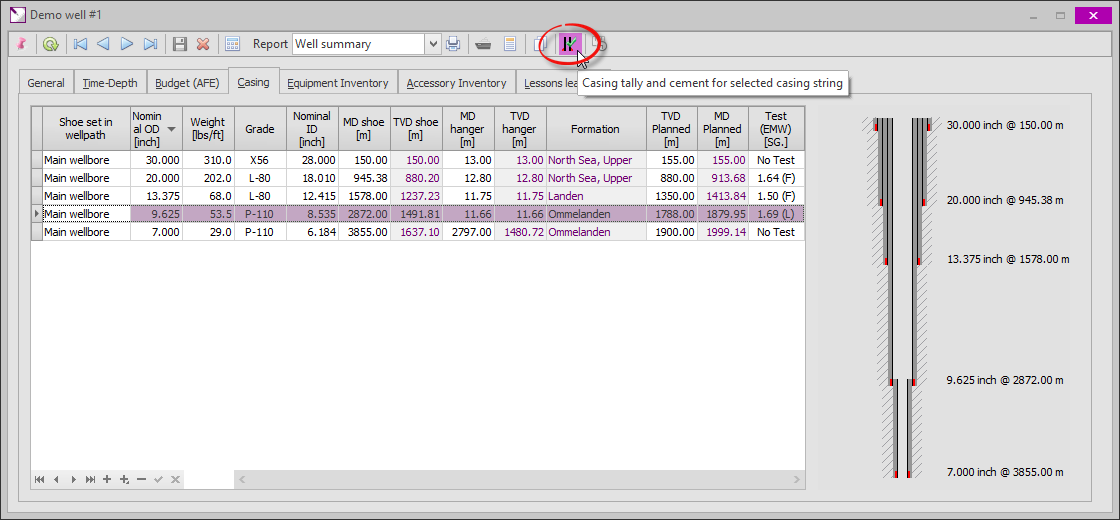
Clicking the  button in the toolbar will bring up the Casing Tally and Cement dialog for the selected casing string. In this dialog, the detailed casing tally and cement jobs may be logged.
The second tab contains the cement jobs. This screen is explained below.
.png)
|
Stage number |
|
|
A casing cement job may consist of multiple stages (e.g. when using a stage collar on a long string to ensure cementation of the annulus with the previous casing string. Using the data navigator, additional stages may be inserted, added or deleted. The stages visible are for the selected casing (on the well form) only. To add a cement job for another casing string, this form must be closed and re-opened after selecting the other casing string. |
|
|
|
|
.png)
.png)
.png)
.png)
|
Fluids & slurries pumped |
|
|
Detailed information on the fluids and cement slurries pumped. The following sequence is assumed: 1.Preflush fluid (e.g. seawater, not mud) 2.First spacer 3.Lead cement 4.Tail cement 5.Second spacer 6.Displacement fluid (e.g. mud or seawater) All above fluids, with the exception of the lead cement, are optional. If a fluid (e.g. the preflush fluid) was not pumped, the Pumped checkbox should be unchecked and the other data fields left blank. If only a single slurry was pumped, it should be entered as the lead slurry and the tail slurry should be entered as 'not pumped'. This is simply by convention. |
|
|
|
|
.png)
.png)
|
Results |
|
|
Here the results of the cement job can be logged. The Remarks field is a memo field where a job summary, providing all relevant details on the cement job, should be entered. |
|
|
|
|
.png)
.png)
|
Copyright © 2023 Softdrill NL |