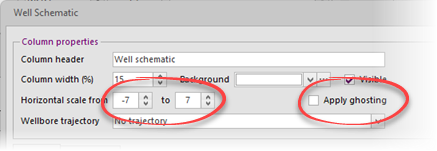
By setting the (virtual) horizontal scale, the with of the well schematic can be controlled.
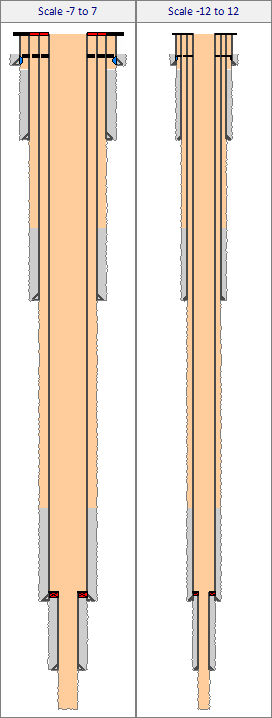
For example the same schematic is shown below for a -7 to 7 and -12 to 12 horizontal range.
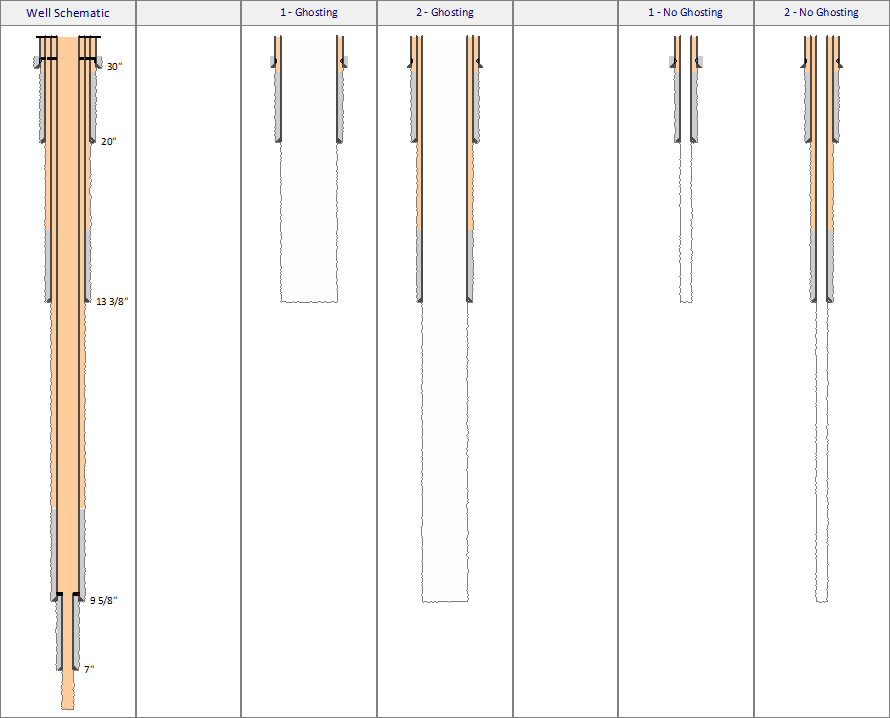
Ghosting controls the width of schematic (on the same horizontal scale) if one or more casing strings are not shown (not visible). To understand this setting, consider below drawing.
The left-most shows the well as it will ultimately be constructed. In the other schematics only part of the schematic is shown. Subsequent casings are defined in the schematic but not shown. When ghosting is applied, the non-visible casing strings will occupy a horizontal index position (i.e. the largest casing is show at the same index position as if all casing strings were shown). The two right-most schematics show the effect if ghosting is not applied. Only visible casing string will be indexed (i.e. the largest casing is shown on a lower index position) resulting in a narrower schematic.
This feature is specifically useful if a well sketch must be built that shows multiple schematics for each phase of a well construction. In that case, build a full schematic with all casings etc. defined. Once completed, copy the the column (copy & paste) multiple times, hide casing strings not applicable to each schematic and apply ghosting.
Copyright © 2025 Softdrill NL