Sometimes it may be required to update a license key. This may be the case when extending a license or adding licenses to the key. Updating the license key, can be done via email.
To update a license key (the process is the same for hardware and software license keys), the following steps must be performed:
•Double-click the CodeMeter icon in the System Tray. The System Tray is in the bottom-right corner of your screen. Alternatively you may right-click the icon and select [Show…] from the menu.

•On the License tab in the CodeMeter Control Center, select the license key you wish to update (1) and click the [License Update] button (2).

•Produce the update request file by following the steps on screen. First select ‘Create a license request’ and click the [Next] button.
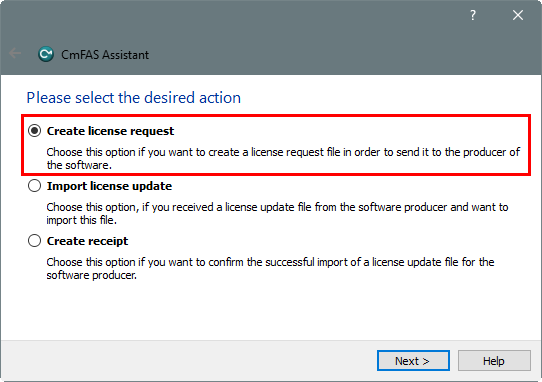
•On the next step select ‘Extend existing license’ and click the [Next] button.

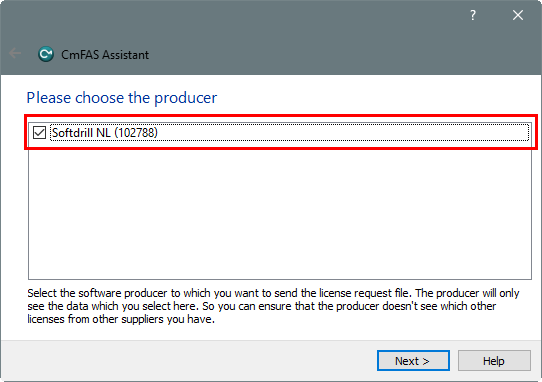
•Select producer ‘Softdrill NL’ (the number in brackets will be different, depending on the type of license key you are updating) and click the [Next] button.
•Save the .WibuCmRaC file to a folder of your choice. It is recommended to leave the file name unchanged, but with the ellipsis button [...] an alternative folder location may be selected. Save the file by clicking the [Commit] button.

•Send the .WibuCmRaC file you just generated, as an attachment to an email to Softdrill NL.
•By return email Softdrill NL will send a .WibuCmRaU file. To finalize updating the license key, save this file to a folder of choice and from there simply drag it onto the CodeMeter Control Center to update the license key.
|
Copyright © 2023 Softdrill NL |